

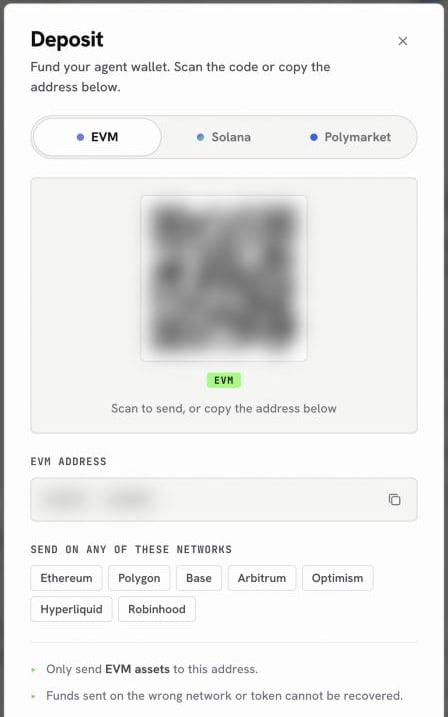
Step one of the easy route: the EVM tab, sending on Arbitrum
Pick your route
- Through your OpenFinance wallet (easiest)
- Straight from an exchange
1
Send USDC on Arbitrum to your wallet
Open the Deposit sheet, stay on the EVM tab, and send USDC on Arbitrum to your address.
2
Move it onto Hyperliquid
Ask the agent:Check the summary and confirm. Your Hyperliquid balance is credited within minutes.
If your USDC is somewhere else
Most people do not start with USDC on Arbitrum, and that is fine. The agent can bridge it there first, then deposit.Check your balance
Ask “What is my Hyperliquid balance?”. You get one USDC figure, because OpenFinance uses Hyperliquid’s unified account, where spot and perp USDC share one pool.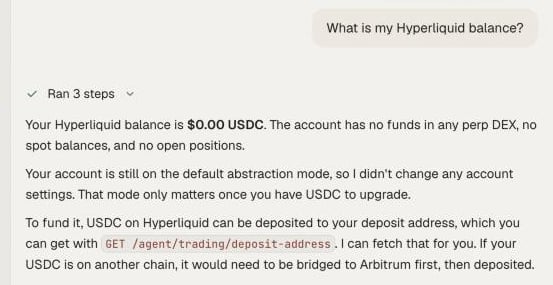
One USDC balance for spot and perps
Getting money back out
Withdrawals go to Arbitrum, to the same address, and take about five minutes. Ask “Withdraw 50 USDC from Hyperliquid to Arbitrum” and confirm.Next
Hyperliquid
Perps, spot and stock perps explained.
Perp with take-profit and stop-loss
Your first trade, with exits attached.