

Find your Polymarket deposit address
1
Open the Deposit sheet
Click Deposit in the top bar, then Deposit under your wallet total.
2
Choose the Polymarket tab
The sheet shows your Polymarket deposit address, a QR code and the line “Send pUSD on this network: Polygon”.
3
Copy the address
Use the copy button rather than retyping it. You can also ask the chat “What is my Polymarket deposit address?”.
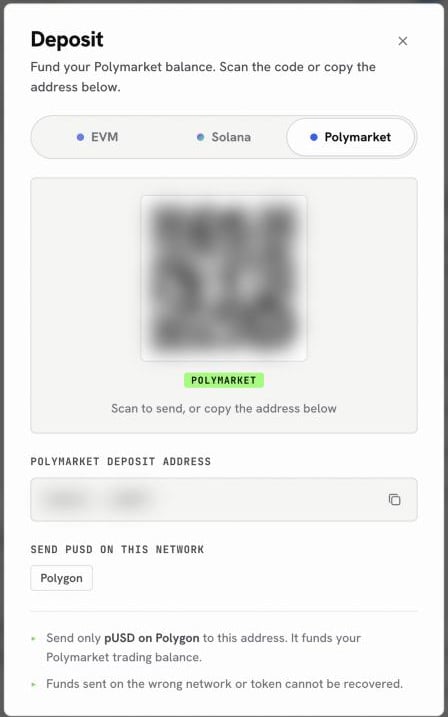
The Polymarket tab of the Deposit sheet
Fund it
There are two ways in, depending on where your money is now.- From an exchange or another wallet
- From your OpenFinance wallet
Send pUSD on Polygon to the Polymarket deposit address. Nothing else: not USDC on another chain, not USDT. Funds on the wrong network or token cannot be recovered.
Check it arrived
Ask “What is my Polymarket balance?”. The agent reports what is ready to trade in your deposit wallet. Then head to Polymarket to place your first order.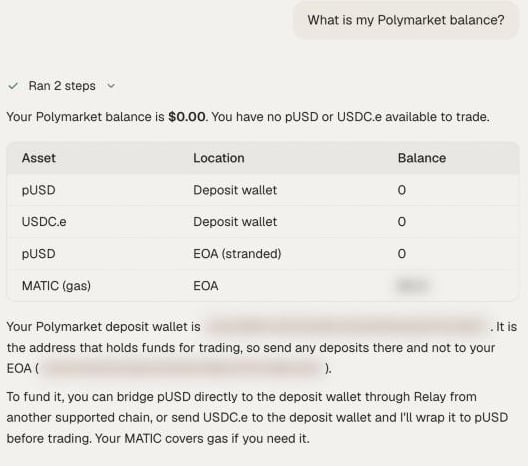
The agent confirms what is ready to trade
The first time you open External AI, a one-time notice reminds you to send only pUSD to Polymarket. It is the same rule as above, shown once so it sticks.
Next
Polymarket
How prediction markets work and what to ask.
Polymarket from research to redeem
A full trade, end to end.