

How it works
OpenFinance does not take your card details. It builds a checkout link with one of two providers and hands it to you:
The provider is picked from the currency you pay in. You finish payment, and any identity check the provider requires, on the provider’s own page. The crypto is delivered to your wallet address on the chain you chose.
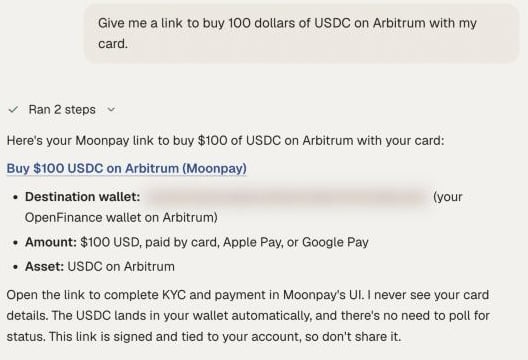
A checkout link in chat for buying USDC with a card
Use it
1
Say what you want to buy
Name the amount, the currency you pay in, the token and the chain. For example: “Buy 100 dollars of USDC on Arbitrum with my card.”
2
Open the link
The agent returns a checkout link. Open it and complete payment with the provider.
3
Check that it arrived
Ask “what do I hold on Arbitrum?” once the provider says the order is complete.
4
Move it to the venue
Wallet funds are not yet on a venue. Deposit to Hyperliquid or Polymarket, or swap onchain.
Example prompts
Prompts like these work in the chat:- “Give me a link to buy 100 dollars of USDC with my card.”
- “Buy 50 euros of ETH on Base.”
- “Add 5000 rupees of USDC with UPI.”
- “I have no crypto. What is the fastest way to start trading BTC perps?”
- “Buy SOL with Apple Pay.”
Paying in INR
Onramp.money supports a fixed set of token and network pairs:
If you ask for a pair outside this list, such as USDC on Ethereum with INR, the agent proposes a supported one.
From your own agent
Your own agent needs one tool,get_onramp_url. Pass the fiat currency, amount, token and chain, and return the link to the user. See Wallet and onramp tools.
Limits
- The provider sets its own limits and exchange rate, and shows them at checkout before you pay.
- OpenFinance does not run identity checks itself. Moonpay and Onramp.money may require them.
- Which payment methods and currencies you see depends on the provider and on where you live.
- The agent cannot see or track your payment. Check your wallet balance to confirm delivery.
FAQ
Where does the crypto go?
Where does the crypto go?
To your own OpenFinance wallet: your EVM address for EVM chains, or your Solana address if you chose Solana.
Can I buy straight into Hyperliquid or Polymarket?
Can I buy straight into Hyperliquid or Polymarket?
No. The onramp delivers to your wallet. Deposit to the venue as a second step.
Can I already have crypto and skip this?
Can I already have crypto and skip this?
Yes. Send it to your wallet address from any exchange or wallet. See Wallet.
Next
Bridge and swap
Get funds to the right chain.
Markets overview
What each venue needs before you trade.