

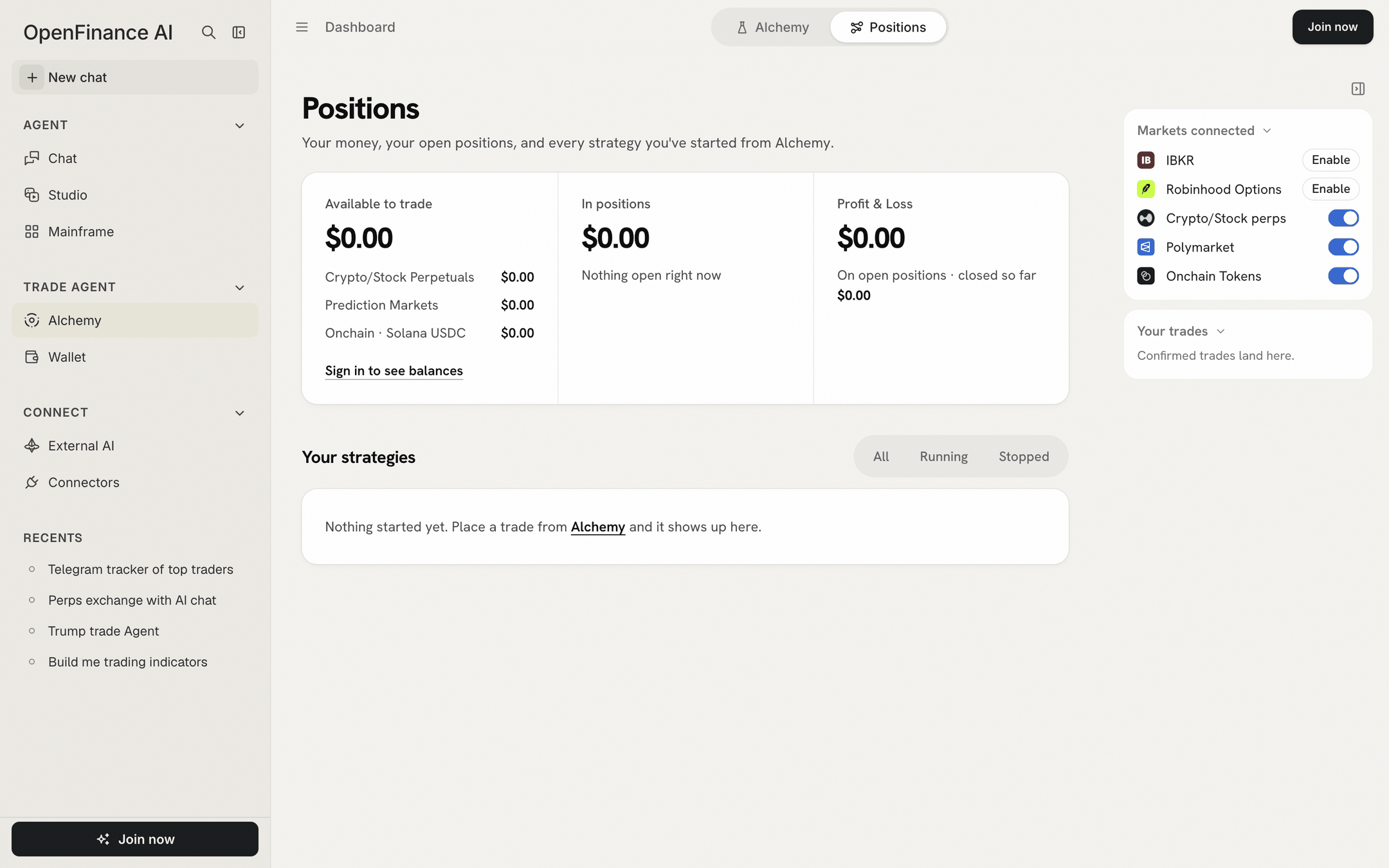
Positions signed out: the three money panels, the strategies list and the Markets connected panel
How it works
Two sources feed this page:- The venues. Balances and open positions are read live from your Hyperliquid account, your Polymarket deposit wallet and your Solana wallet.
- Your browser. Each trade you confirm in an Alchemy ticket is recorded in this browser, with the question it came from. That record is what turns positions into “strategies”.
The three panels
Across the top, three panels sum up your money.
Under Available to trade you get Add money and Withdraw, which open the Wallet, and Refresh. Signed out, the panels show zero and a Sign in to see balances link.
Tokenized stocks bought through xStocks count in your Solana wallet, not in In positions or Profit & Loss here.
Your strategies
Below the panels, Your strategies lists one block per Alchemy question. Each block is labelled Strategy with the question as its title and the number of trades. Each block is a table:
Useful details:
- Click a block’s title to reopen the Alchemy result it came from. If that result is no longer saved in this browser, the question is asked again, which starts a new run and spends AI credits.
- Click anywhere else on a block’s header to fold or unfold it.
- A row reading “no open position” was recorded here but the venue holds nothing now, for example because you closed it elsewhere.
- Non Alchemy Trades, labelled “Open on your account”, lists open positions with no Alchemy record in this browser: trades placed in Chat, on another device, or straight on the venue. They can be closed here too.
Filters: All, Running, Stopped
The switch at the top right filters the strategies, with a count on each.- Running: trades you sent that have not been closed from this page.
- Stopped: trades you closed from this page.
- All: both.
Close a position
Nothing closes a trade for you, so this is how you exit. Closing takes two clicks, which means one stray click sends nothing.1
Find the row
Open All or Running and find the position.
2
Click Close
The button turns into Confirm close for a few seconds.
3
Click Confirm close
The row shows Closing, then a note with the result, for example what filled and at what price.
- Hyperliquid perp: one reduce-only order for the whole position on the other side, capped about 1% from the mark price.
- Polymarket: a fill-or-kill sell of every share, at no less than about 3¢ under the current price. A position worth under $1 is below Polymarket’s minimum and cannot be sold this way.
- Settled means the market has resolved. Redeem it from Polymarket or the Wallet page; it cannot be sold.
- Remove appears when there is nothing to close. It removes the record from this list only.
- xStocks tokens have no Close here. Sell them elsewhere in OpenFinance, for example by asking Chat to swap them back to USDC.
Your trades panel
The right panel’s Your trades box lists your latest confirmed trades with venue, amount and status (“sent” or “stopped”), the total Deployed, and View positions. The small x on a row removes it from the list; it does not close the position.Limits
- The strategy records live in this browser. On another device or browser your positions still show, under Non Alchemy Trades, but not grouped by question.
- Clearing your browser data removes the records, not the positions.
- Balances load when you open the tab and reload after a close. Use Refresh for a fresh read.
Next
The order ticket
How orders are placed.
History, models and credits
Reopen past runs.