

Open a ticket
Click Action on a trade card, Trade on a basket row or a route, the lightning button next to a related market, or Open ticket in Review your basket. Opening a ticket is free and places nothing. You can open one signed out to look; confirming asks you to sign in.What to fund first
Each venue spends from its own balance. The ticket checks the right one for you.
pUSD on your main wallet address cannot buy Polymarket shares; it has to be in the deposit wallet. See Polymarket and Hyperliquid for how each is funded.
The ticket, by venue
The ticket changes with the venue. Pick the tab for the trade you are placing.- Prediction market
- Perp on Hyperliquid
- xStocks on Solana
- Pick Yes or No; each shows its price in cents.
- Enter an amount in dollars, or add $5, $10, $25 or $50 with the chips.
- The ticket shows Price now, Shares and To win, and “Pays up to” a cap 3¢ above the price so the order can fill.
- The order is a fill-or-kill market buy from your Polymarket deposit wallet in pUSD: it fills in full or not at all.
- Orders from Alchemy start at $5. Some markets also need a minimum number of shares.
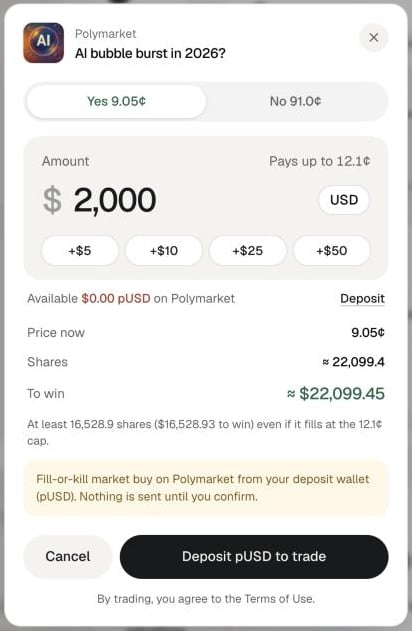
A Polymarket ticket: side, amount, available pUSD and what you win
Prices on a saved result
Not everything is frozen, though. Charts on the cards, xStocks quotes, and the Hyperliquid routes in Trade Exposure and the Ontology load live prices when you open the result.Funds and confirming
Signed in, the ticket shows Available for that venue, with a Deposit link that opens the deposit window on the right tab. The ticket keeps your amount and side while you deposit.- Not enough? A red line says how much the order needs and how much you have.
- Nothing on the venue? The main button becomes Deposit USDC to trade, or Deposit pUSD to trade for Polymarket.
- Signed out, the button reads Sign in to trade.
1
Check side and amount
Make sure the side matches the trade you meant. The ticket lets you flip it.
2
Read the yellow note
It says exactly what kind of order will go out and ends “Nothing is sent until you confirm.”
3
Confirm
Press the black button, for example Buy Yes · $25 or Long · $100. By trading you agree to the Terms of Use.
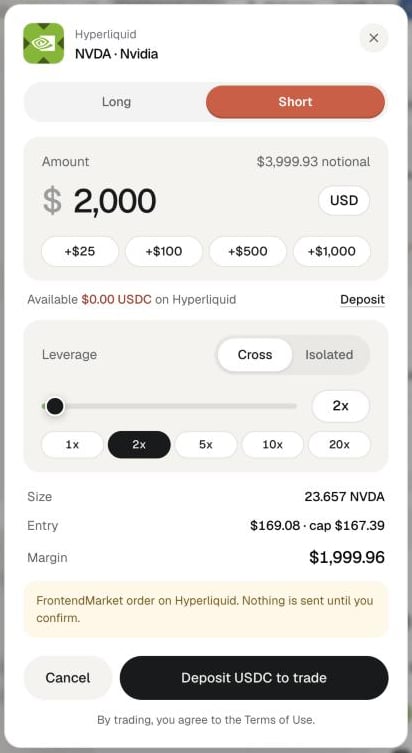
A perp ticket with margin mode and leverage
What happens after
- The ticket shows Order sent with what filled, or Not placed with the reason, such as a venue rejection. Click Done.
- A sent trade appears in Your trades on the right panel, with the total deployed and View positions.
- On the Positions tab it is grouped under the question that led to it.
- Balances refresh after every order.
- No take-profit or stop order is placed. Exit yourself, for example with Close on Positions.
Common mistakes
- Funding the wrong place. Money in the wrong wallet or on the wrong chain does not count for that venue.
- Trading an old result. Ask again first; see above.
- Expecting a stop. Nothing closes the trade for you. Watch your positions.
- Too much leverage on a long hold. Funding is paid or earned every hour. Read the hold note in Learn first.
Next
Positions
Track and close what you placed.
Wallet
Fund each venue.