

Where the samples are
The Alchemy page shows two lists under the event box.- Example chips. A row of example events. The ones tagged Try me are samples. Hover one and it says “Sample run: opens instantly, no credits used”.
- Hot queries. A short list under the Hot queries switch, labelled “What people are running”. The first row, Impact of AI Bubble crash, is also a sample.

Example chips: the ones tagged Try me open a saved sample
Walk through a sample
With a sample picked out, here is the whole run, from the first click to the basket at the bottom.1
Open Alchemy
Click Alchemy under Trade Agent in the sidebar, or go to openfinance.tech/alchemy.
2
Pick a sample
Click Impact of AI Bubble crash under Hot queries, or any chip tagged Try me. The event box folds into a slim bar at the top with your question in it.
3
Watch the steps
A checklist appears and ticks through the same eight steps a live run takes. A sample replays them in a few seconds. A live run shows a clock and the note “Can take 3–4 minutes”.
4
Read the summary
The first card names the headline Polymarket question and its odds, then eight number tiles and the scenarios. See Reading a result for each one.
5
Read the Alchemy take
The second card is Alchemy’s call in its own words, with Detailed analysis on the right and three view tabs at the bottom.
6
Switch views
Click Trade YES, Trade NO or Alchemy’s pick. Everything below the take follows the view you choose.
7
Look at the basket
Basket trades lists the trades for that view, sized to a $10,000 budget by default. Switch between Cards and List.
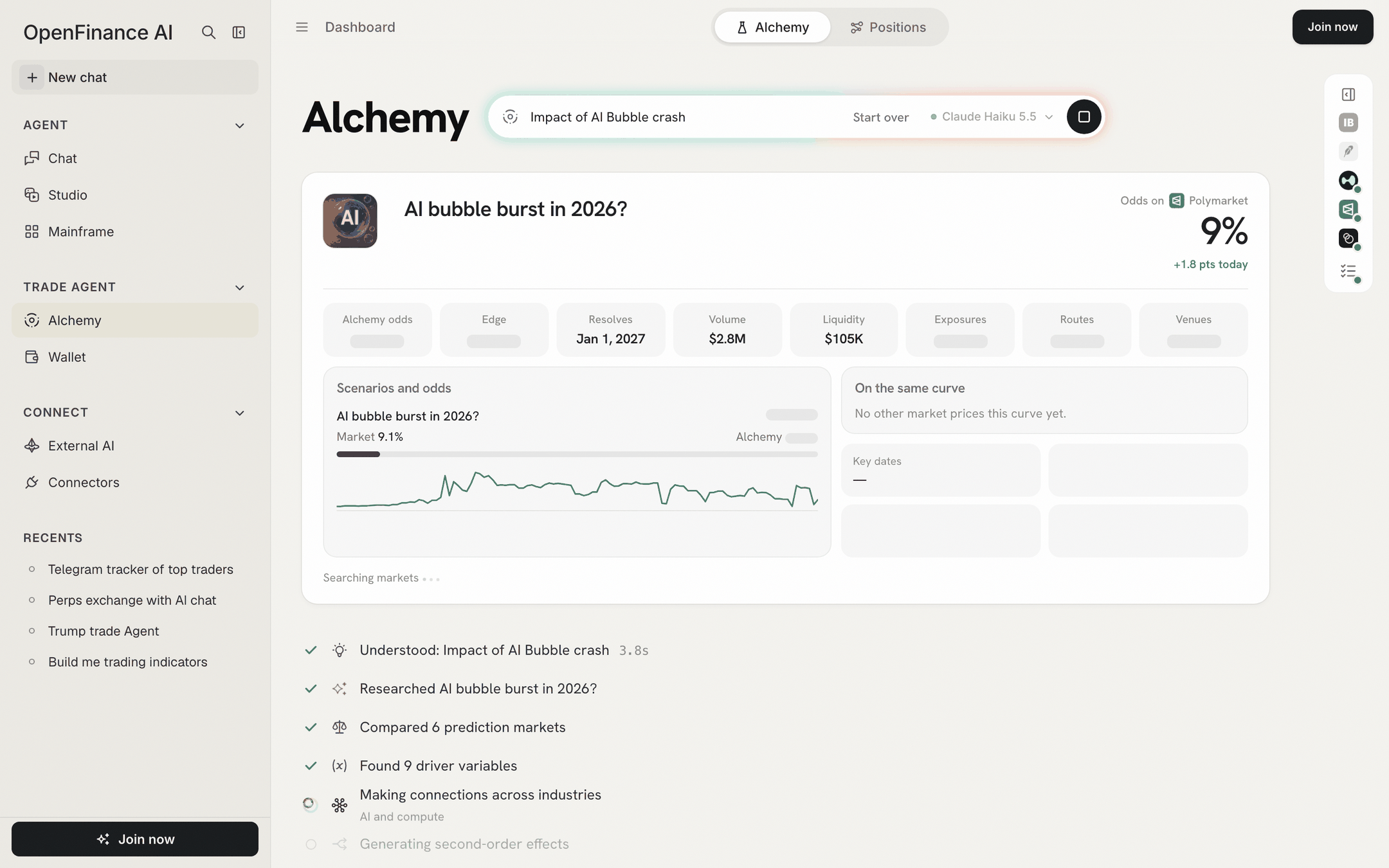
A run in progress: the summary fills in while the steps tick down
The eight steps
The checklist you watched in step 3 names each stage of the work. This is what Alchemy does in each one.
The summary card fills in early, as soon as Alchemy has found the market. You can read the market’s odds while the rest is still working.
What you just saw
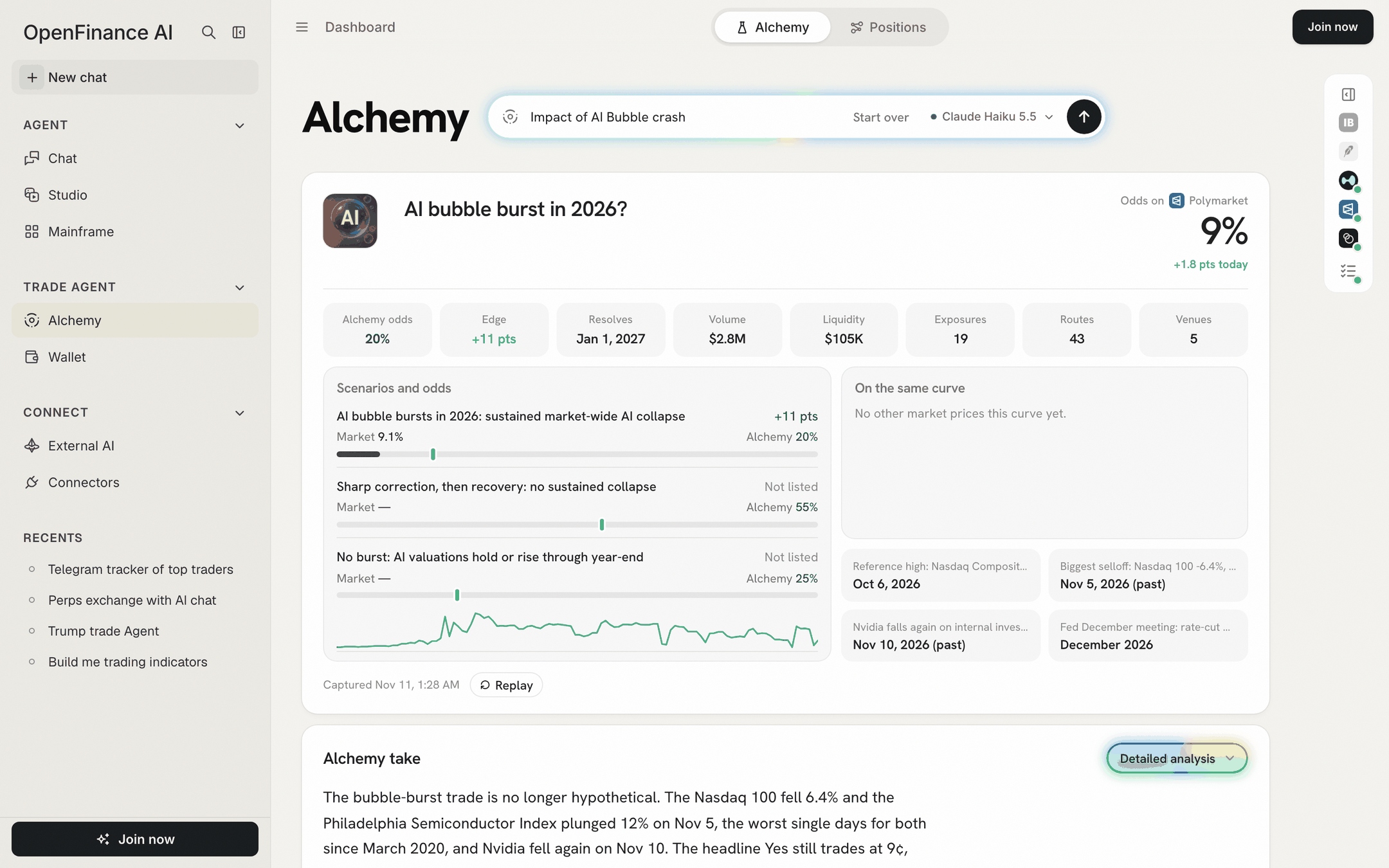
The top of a result: the market's answer, Alchemy's numbers and the scenarios
Numbers in a sample are frozen at the time it was captured, shown at the bottom of the summary card. Charts inside the trade cards still load live prices. A sample also shows a Replay button, which plays the steps again.
After the sample
- Click Start over in the top bar to clear the result and return to the empty box.
- Signed in, the sample is saved under My history, so you can reopen it later.
- When you are ready, type your own event. Writing good events shows how to phrase it.
Your first live run
When you want an answer to a question of your own, a live run takes four steps.1
Sign in
A live run spends your AI credits, so Alchemy asks you to sign in first.
2
Type one event
One clear outcome with a date works best, for example “Fed cuts rates in December”.
3
Pick a model, or keep the default
The model picker sits next to the send button. See History, models and credits.
4
Send and wait
Press Enter or the arrow. The square button stops the run. You can move to another page of the app and come back; the run keeps going in that browser tab and shows in the sidebar’s Recents.
Next
Reading a result
What each number and section means.
Writing good events
Example events you can paste.