Your money is on one chain and your next trade needs it on another. Here is how to bridge it with your agent without sending anything you have not checked.
By the end of this guide you will have moved funds from the chain they sit on to the chain your next trade needs, read the quote before sending, and confirmed that the transfer finished.A bridge moves value from one blockchain to another. OpenFinance routes bridges and cross-chain swaps through Relay. The agent picks the route for you: a swap between two Solana tokens goes through Jupiter, and a send on one chain with no token change is a plain transfer. See Bridge and swap for how it works.
What you need
Funds on the chain you are leaving, plus a little of that chain’s native coin for gas.
A clear destination: which chain and which token your next trade needs. The table in Fund each venue lists them.
Steps
1
Find what you hold and where
What do I hold on every chain, in dollars? Include Solana and Robinhood Chain, and say which chains you checked.
2
Ask for a quote, not a transfer
Name the source chain, the token, the amount and the destination:
Quote bridging 100 USDC from Base to Arbitrum. Do not send anything yet.
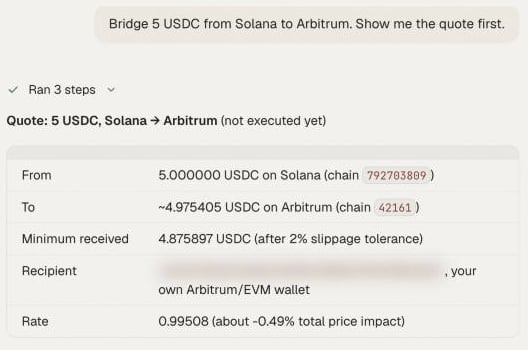
A good quote shows what leaves, what is expected to arrive and the route. A quote is free and sends nothing.
A bridge quote in chat: what leaves, what arrives and the route
3
Check the quote
Before you say yes, check three things:
The destination is your own wallet. Bridges from an agent can only go to your own addresses; the server refuses anything else.
The amount that arrives is what your trade needs.
The token on arrival is the one the venue accepts, for example USDC on Arbitrum for Hyperliquid.
4
Confirm the bridge (moves money)
Reply yes, or ask for a fresh quote if you waited a while or changed the amount. Quotes expire.The agent signs each step with your wallet and waits for a final result for up to about five minutes.
5
Track it to the end
What is the status of my last bridge?
A transfer ends as success, refunded or failure. While it is in progress you may see waiting, pending or submitted.
6
Continue to the trade (moves money)
Bridging and depositing can be chained, with a confirmation at each step:
Now deposit the USDC that arrived on Arbitrum to my Hyperliquid account.
Every bridge and swap needs your confirmation, and nothing here is financial advice.
Useful combinations
Most trips follow one of a few patterns, and you can paste the Ask column as it is:
You have
You need
Ask
USDC on Base or Polygon
Hyperliquid
”Bridge my USDC to Arbitrum, then deposit it to Hyperliquid.”
USDC on Solana
An EVM chain
”Move 50 USDC from Solana to Base. Quote first.”
ETH on Arbitrum
SOL for Solana swaps
”Swap 0.05 ETH on Arbitrum for SOL on Solana. Quote first.”
ETH on Base
USDC on Base
”Swap 0.05 ETH for USDC on Base.”
Check it worked
When the status reads success, look at where the funds landed:
Show my balance on the destination chain.
The amount should match the quote, give or take a small difference.
Common mistakes
No gas on the starting chain. The first transaction is paid on the chain you leave.
No native coin at the destination on Solana routes. On routes that touch Solana, the automatic gas top-up is switched off.
Trying to bridge to a friend. Agent bridges go to your own wallets only. To pay someone else, use the Wallet page.
Panicking at “refunded”. Refunded means the route could not complete and funds were returned. Ask for the status details and a new quote.
A 412 on a route from Solana. Your Solana wallet is not yet enabled for agent trading. Follow the instructions in the error.
Next guides
Hyperliquid perp with take-profit and stop-loss
Use the funds you just moved.
Relay tools
Quote and execute parameters for your own code.
⌘I
{"docsConfig":{"theme":"maple","$schema":"https://mintlify.com/docs.json","name":"OpenFinance","description":"OpenFinance is an AI workspace for financial markets: research, trade and build across crypto, stocks, forex and prediction markets from one account and one API key.","colors":{"primary":"#2E7D57","light":"#8FCFAA","dark":"#276C4B"},"logo":{"light":"https://mintcdn.com/openfinance/-pu5SodoQuhEwuR-/images/logo-light.png?fit=max\u0026auto=format\u0026n=-pu5SodoQuhEwuR-\u0026q=85\u0026s=9147837b7ce403d08ec3575b3d5c54d0","dark":"https://mintcdn.com/openfinance/-pu5SodoQuhEwuR-/images/logo-dark.png?fit=max\u0026auto=format\u0026n=-pu5SodoQuhEwuR-\u0026q=85\u0026s=10850bb79097b83818fa82156c4c6bfb","href":"https://openfinance.tech"},"favicon":"https://mintcdn.com/openfinance/-pu5SodoQuhEwuR-/favicon.png?fit=max\u0026auto=format\u0026n=-pu5SodoQuhEwuR-\u0026q=85\u0026s=4edd5023d11e5bc6b6fa4bf9309b071f","appearance":{"default":"light"},"background":{"color":{"light":"#F4F3EF","dark":"#1F1E1D"}},"navbar":{"links":[{"href":"mailto:dev@openfinance.tech","label":"Contact: dev@openfinance.tech"}],"primary":{"type":"button","label":"Get API Key","href":"https://openfinance.tech"}},"footer":{"socials":{"x":"https://x.com/openfinancelabs","github":"https://github.com/openfinance-tech"}},"seo":{"indexing":"all"},"fonts":{"heading":{"family":"Inter"},"body":{"family":"Inter"}},"styling":{"eyebrows":"section","codeblocks":"system","latex":false},"contextual":{"options":["copy","view","claude","chatgpt"],"display":"header"},"navigation":{"global":{"anchors":[{"anchor":"Full Tool Reference","icon":"book-open","href":"/mcp/overview"},{"anchor":"Dashboard","icon":"gauge","href":"https://openfinance.tech"}]},"pages":[]}},"deployment":{"deploymentMetadataValue":{"subdomain":"openfinance","hasAudioNarration":false,"actualSubdomain":"openfinance","customDomains":["docs.openfinance.tech"],"gitSource":{"type":"github","owner":"folome-online","repo":"mintlify-docs","deployBranch":"main","contentDirectory":"","isPrivate":false,"mountPath":"","label":""},"entitlements":{"AI_CHAT":{"status":"DISABLED"}},"buildId":"6af5b20104140d5ce9d6754e","clientVersion":"0.0.4143","searchFilterCounts":[{"language":"default","tag":"Docs","count":24},{"language":"default","tag":"Mainframe","count":20},{"language":"default","tag":"Connect an agent","count":19},{"language":"default","tag":"Agent guides","count":14},{"language":"default","tag":"Trade","count":13},{"language":"default","tag":"Templates","count":12},{"language":"default","tag":"Alchemy","count":10},{"language":"default","tag":"MCP and API","count":10},{"language":"default","tag":"Markets","count":9},{"language":"default","tag":"App","count":9}]},"assistantConfig":{"enableAskAiButton":false,"enableStarterQuestions":false,"enableContextualStarterQuestions":false,"enableAskAiSearchBar":true},"basePath":"","hasChatPermissions":false,"hasWebMcpPermissions":false,"toggles":[{"name":"kill-isr","enabled":true,"variant":{"name":"disabled","enabled":false,"feature_enabled":true},"impressionData":false},{"name":"custom-rbac-roles","enabled":true,"variant":{"name":"disabled","enabled":false,"feature_enabled":true},"impressionData":false},{"name":"agent-mintlify-slack","enabled":true,"variant":{"name":"disabled","enabled":false,"feature_enabled":true},"impressionData":false},{"name":"agent-integrations-settings","enabled":true,"variant":{"name":"disabled","enabled":false,"feature_enabled":true},"impressionData":false},{"name":"rbac-expansion","enabled":true,"variant":{"name":"disabled","enabled":false,"feature_enabled":true},"impressionData":false},{"name":"automations-pr-grouping","enabled":true,"variant":{"name":"disabled","enabled":false,"feature_enabled":true},"impressionData":false},{"name":"custom-prefix","enabled":true,"variant":{"name":"disabled","enabled":false,"feature_enabled":true},"impressionData":false},{"name":"analytics-v7","enabled":true,"variant":{"name":"disabled","enabled":false,"feature_enabled":true},"impressionData":false},{"name":"user-flows-analytics","enabled":true,"variant":{"name":"disabled","enabled":false,"feature_enabled":true},"impressionData":false},{"name":"no-publish-flow","enabled":true,"variant":{"name":"disabled","enabled":false,"feature_enabled":true},"impressionData":false},{"name":"workos-onboarding","enabled":true,"variant":{"name":"disabled","enabled":false,"feature_enabled":true},"impressionData":false},{"name":"snapshot-serving-live","enabled":true,"variant":{"name":"disabled","enabled":false,"feature_enabled":true},"impressionData":false},{"name":"stripTemperatureMiddleware","enabled":true,"variant":{"name":"disabled","enabled":false,"feature_enabled":true},"impressionData":false},{"name":"support-platform-pylon-zendesk","enabled":true,"variant":{"name":"disabled","enabled":false,"feature_enabled":true},"impressionData":false},{"name":"snapshot-serving","enabled":true,"variant":{"name":"disabled","enabled":false,"feature_enabled":true},"impressionData":false},{"name":"instant-rollback","enabled":true,"variant":{"name":"disabled","enabled":false,"feature_enabled":true},"impressionData":false},{"name":"granular-notifications-server","enabled":true,"variant":{"name":"disabled","enabled":false,"feature_enabled":true},"impressionData":false},{"name":"granular-notifications","enabled":true,"variant":{"name":"disabled","enabled":false,"feature_enabled":true},"impressionData":false},{"name":"automations-fable","enabled":true,"variant":{"name":"disabled","enabled":false,"feature_enabled":true},"impressionData":false},{"name":"fixed-ai-action-pricing","enabled":true,"variant":{"name":"disabled","enabled":false,"feature_enabled":true},"impressionData":false},{"name":"automation-resolve-merge-conflict","enabled":true,"variant":{"name":"disabled","enabled":false,"feature_enabled":true},"impressionData":false},{"name":"scoped-publishing","enabled":true,"variant":{"name":"disabled","enabled":false,"feature_enabled":true},"impressionData":false},{"name":"mintql","enabled":true,"variant":{"name":"disabled","enabled":false,"feature_enabled":true},"impressionData":false},{"name":"page-level-analytics","enabled":true,"variant":{"name":"disabled","enabled":false,"feature_enabled":true},"impressionData":false},{"name":"editor-version-history-v2","enabled":true,"variant":{"name":"disabled","enabled":false,"feature_enabled":true},"impressionData":false},{"name":"billing-page-v2","enabled":true,"variant":{"name":"disabled","enabled":false,"feature_enabled":true},"impressionData":false},{"name":"full-page-search","enabled":true,"variant":{"name":"disabled","enabled":false,"feature_enabled":true},"impressionData":false},{"name":"workspace-projects","enabled":true,"variant":{"name":"disabled","enabled":false,"feature_enabled":true},"impressionData":false},{"name":"assistant-v5","enabled":true,"variant":{"name":"disabled","enabled":false,"feature_enabled":true},"impressionData":false},{"name":"fork-pr-previews","enabled":true,"variant":{"name":"disabled","enabled":false,"feature_enabled":true},"impressionData":false},{"name":"revalidation-jwt","enabled":true,"variant":{"name":"disabled","enabled":false,"feature_enabled":true},"impressionData":false},{"name":"workos-sso-scim","enabled":true,"variant":{"name":"disabled","enabled":false,"feature_enabled":true},"impressionData":false},{"name":"hobby-abuse-scan","enabled":true,"variant":{"name":"disabled","enabled":false,"feature_enabled":true},"impressionData":false},{"name":"dashboard-inbox","enabled":true,"variant":{"name":"disabled","enabled":false,"feature_enabled":true},"impressionData":false},{"name":"workos-signup","enabled":true,"variant":{"name":"disabled","enabled":false,"feature_enabled":true},"impressionData":false},{"name":"turbopuffer-dual-write","enabled":true,"variant":{"name":"disabled","enabled":false,"feature_enabled":true},"impressionData":false},{"name":"workos-enabled","enabled":true,"variant":{"name":"disabled","enabled":false,"feature_enabled":true},"impressionData":false},{"name":"approve-review-flow","enabled":true,"variant":{"name":"disabled","enabled":false,"feature_enabled":true},"impressionData":false},{"name":"editor-metadata","enabled":true,"variant":{"name":"disabled","enabled":false,"feature_enabled":true},"impressionData":false},{"name":"sso-setup-deadline-banner","enabled":true,"variant":{"name":"disabled","enabled":false,"feature_enabled":true},"impressionData":false},{"name":"turbopuffer-serve","enabled":true,"variant":{"name":"disabled","enabled":false,"feature_enabled":true},"impressionData":false},{"name":"live-agents","enabled":true,"variant":{"name":"disabled","enabled":false,"feature_enabled":true},"impressionData":false},{"name":"llms-txt-v2","enabled":true,"variant":{"name":"disabled","enabled":false,"feature_enabled":true},"impressionData":false}],"googleFontsInlined":false},"customCss":[{"filePath":"style.css","content":":root{--of-bg: #f4f3ef;--of-rail: #eceae4;--of-surface: #ffffff;--of-text: #1f1e1d;--of-text-2: #6b6862;--of-line: rgba(31, 30, 29, 0.10);--of-green: #2e7d57;--of-green-text: #1e6647;--of-green-tint: #e8efe4;--of-pill: #e7e4d8;--of-clay: #d97757}.card{border-color:var(--of-line)!important;box-shadow:0 1px 0 rgba(31, 30, 29, 0.02);transition:border-color 0.15s ease, box-shadow 0.15s ease, transform 0.15s ease}a.card:hover,.card[role=\"link\"]:hover{box-shadow:0 6px 20px -10px rgba(31, 30, 29, 0.25);transform:translateY(-1px)}.card [data-component-part=\"card-image\"]{aspect-ratio:3 / 2;border-bottom:1px solid var(--of-line)}.frame,[data-component-part=\"frame\"]{background:var(--of-rail)}.dark .frame,.dark [data-component-part=\"frame\"]{background:rgba(255, 255, 255, 0.04)}.dark .card{border-color:rgba(255, 255, 255, 0.10)!important}img.nav-logo{height:28px!important;max-width:none!important;padding-left:0!important;padding-right:0!important}@media (max-width: 1023px){img.nav-logo{height:30px!important}}.frame img,[data-component-part=\"frame\"] img{width:auto!important;max-width:100%;margin-left:auto;margin-right:auto}"}],"page":{"pagePath":"guides/move-funds-between-chains","slug":"/guides/move-funds-between-chains","pageMetadata":{"title":"Move Funds Between Chains Before a Trade","sidebarTitle":"Move funds between chains","description":"Your money is on one chain and your next trade needs it on another. Here is how to bridge it with your agent without sending anything you have not checked.","href":"/guides/move-funds-between-chains"},"description":{"compiledSource":"\"use strict\";\nconst {jsx: _jsx} = arguments[0];\nconst {useMDXComponents: _provideComponents} = arguments[0];\nfunction _createMdxContent(props) {\n const _components = {\n p: \"p\",\n ..._provideComponents(),\n ...props.components\n };\n return _jsx(_components.p, {\n children: \"Your money is on one chain and your next trade needs it on another. Here is how to bridge it with your agent without sending anything you have not checked.\"\n });\n}\nfunction MDXContent(props = {}) {\n const {wrapper: MDXLayout} = {\n ..._provideComponents(),\n ...props.components\n };\n return MDXLayout ? _jsx(MDXLayout, {\n ...props,\n children: _jsx(_createMdxContent, {\n ...props\n })\n }) : _createMdxContent(props);\n}\nreturn {\n default: MDXContent\n};\n","frontmatter":{},"scope":{}},"pageType":"default","mdx":{"mdxSource":{"compiledSource":"\"use strict\";const{Fragment:_Fragment,jsx:_jsx,jsxs:_jsxs}=arguments[0];const{useMDXComponents:_provideComponents}=arguments[0];function _createMdxContent(props){const _components={a:`a`,code:`code`,li:`li`,p:`p`,pre:`pre`,span:`span`,strong:`strong`,tbody:`tbody`,td:`td`,th:`th`,thead:`thead`,tr:`tr`,ul:`ul`,..._provideComponents(),...props.components},{Card,CardGroup,CodeBlock,Frame,Heading,OptimizedImage,Step,Steps,Table}=_components;if(!Card)_missingMdxReference(`Card`,true);if(!CardGroup)_missingMdxReference(`CardGroup`,true);if(!CodeBlock)_missingMdxReference(`CodeBlock`,true);if(!Frame)_missingMdxReference(`Frame`,true);if(!Heading)_missingMdxReference(`Heading`,true);if(!OptimizedImage)_missingMdxReference(`OptimizedImage`,true);if(!Step)_missingMdxReference(`Step`,true);if(!Steps)_missingMdxReference(`Steps`,true);if(!Table)_missingMdxReference(`Table`,true);return _jsxs(_Fragment,{children:[_jsx(_components.p,{children:`By the end of this guide you will have moved funds from the chain they sit on to the chain your next trade needs, read the quote before sending, and confirmed that the transfer finished.`}),`\n`,_jsxs(_components.p,{children:[`A bridge moves value from one blockchain to another. OpenFinance routes bridges and cross-chain swaps through Relay. The agent picks the route for you: a swap between two Solana tokens goes through Jupiter, and a send on one chain with no token change is a plain transfer. See `,_jsx(_components.a,{href:`/markets/bridge-and-swap`,children:`Bridge and swap`}),` for how it works.`]}),`\n`,_jsx(Heading,{level:`2`,id:`what-you-need`,children:`What you need`}),`\n`,_jsxs(_components.ul,{children:[`\n`,_jsx(_components.li,{children:`Funds on the chain you are leaving, plus a little of that chain’s native coin for gas.`}),`\n`,_jsxs(_components.li,{children:[`A clear destination: which chain and which token your next trade needs. The table in `,_jsx(_components.a,{href:`/guides/fund-each-venue`,children:`Fund each venue`}),` lists them.`]}),`\n`]}),`\n`,_jsx(Heading,{level:`2`,id:`steps`,children:`Steps`}),`\n`,_jsxs(Steps,{children:[_jsx(Step,{title:`Find what you hold and where`,children:_jsx(CodeBlock,{filename:``,numberOfLines:`2`,language:`text`,children:_jsx(_components.pre,{className:`shiki shiki-themes github-light-default dark-plus`,style:{backgroundColor:`#ffffff`,\"--shiki-dark-bg\":`#0B0C0E`,color:`#1f2328`,\"--shiki-dark\":`#D4D4D4`},language:`text`,children:_jsxs(_components.code,{language:`text`,numberOfLines:`2`,children:[_jsx(_components.span,{className:`line`,children:_jsx(_components.span,{children:`What do I hold on every chain, in dollars? Include Solana and Robinhood Chain, and say which chains you checked.`})}),`\n`,_jsx(_components.span,{className:`line`,children:_jsx(_components.span,{})})]})})})}),_jsxs(Step,{title:`Ask for a quote, not a transfer`,children:[_jsx(_components.p,{children:`Name the source chain, the token, the amount and the destination:`}),_jsx(CodeBlock,{filename:``,numberOfLines:`2`,language:`text`,children:_jsx(_components.pre,{className:`shiki shiki-themes github-light-default dark-plus`,style:{backgroundColor:`#ffffff`,\"--shiki-dark-bg\":`#0B0C0E`,color:`#1f2328`,\"--shiki-dark\":`#D4D4D4`},language:`text`,children:_jsxs(_components.code,{language:`text`,numberOfLines:`2`,children:[_jsx(_components.span,{className:`line`,children:_jsx(_components.span,{children:`Quote bridging 100 USDC from Base to Arbitrum. Do not send anything yet.`})}),`\n`,_jsx(_components.span,{className:`line`,children:_jsx(_components.span,{})})]})})}),_jsx(_components.p,{children:`A good quote shows what leaves, what is expected to arrive and the route. A quote is free and sends nothing.`}),_jsx(Frame,{caption:`A bridge quote in chat: what leaves, what arrives and the route`,children:_jsx(OptimizedImage,{src:`https://mintcdn.com/openfinance/-pu5SodoQuhEwuR-/images/screens/bridge-chat-relay-quote.png?fit=max\u0026auto=format\u0026n=-pu5SodoQuhEwuR-\u0026q=85\u0026s=a6b60528711067ddb6b232f99c0cc95c`,alt:`OpenFinance chat showing a bridge quote for 5 USDC from Solana to Arbitrum with the amount that arrives, the minimum received, the recipient and the rate`,\"data-og-width\":`528`,width:`528`,\"data-og-height\":`350`,height:`350`,\"data-path\":`images/screens/bridge-chat-relay-quote.png`,\"data-optimize\":`true`,\"data-opv\":`3`,srcset:`https://mintcdn.com/openfinance/-pu5SodoQuhEwuR-/images/screens/bridge-chat-relay-quote.png?w=280\u0026fit=max\u0026auto=format\u0026n=-pu5SodoQuhEwuR-\u0026q=85\u0026s=09b1870205aa1263d647e721d2e037b6 280w, https://mintcdn.com/openfinance/-pu5SodoQuhEwuR-/images/screens/bridge-chat-relay-quote.png?w=560\u0026fit=max\u0026auto=format\u0026n=-pu5SodoQuhEwuR-\u0026q=85\u0026s=14e3ee452eec7c263b07e749dd478e76 560w, https://mintcdn.com/openfinance/-pu5SodoQuhEwuR-/images/screens/bridge-chat-relay-quote.png?w=840\u0026fit=max\u0026auto=format\u0026n=-pu5SodoQuhEwuR-\u0026q=85\u0026s=0a7911f4e6a6ad7b034f01eaff2af732 840w, https://mintcdn.com/openfinance/-pu5SodoQuhEwuR-/images/screens/bridge-chat-relay-quote.png?w=1100\u0026fit=max\u0026auto=format\u0026n=-pu5SodoQuhEwuR-\u0026q=85\u0026s=b0e091564dcdebeff8a5ff7891f2e317 1100w, https://mintcdn.com/openfinance/-pu5SodoQuhEwuR-/images/screens/bridge-chat-relay-quote.png?w=1650\u0026fit=max\u0026auto=format\u0026n=-pu5SodoQuhEwuR-\u0026q=85\u0026s=c9f17de375a4b50145e338240afd0bc3 1650w, https://mintcdn.com/openfinance/-pu5SodoQuhEwuR-/images/screens/bridge-chat-relay-quote.png?w=2500\u0026fit=max\u0026auto=format\u0026n=-pu5SodoQuhEwuR-\u0026q=85\u0026s=ce0453883cf69d6f12a10e39af09b3c3 2500w`})})]}),_jsxs(Step,{title:`Check the quote`,children:[_jsx(_components.p,{children:`Before you say yes, check three things:`}),_jsxs(_components.ul,{children:[`\n`,_jsxs(_components.li,{children:[_jsx(_components.strong,{children:`The destination is your own wallet.`}),` Bridges from an agent can only go to your own addresses; the server refuses anything else.`]}),`\n`,_jsxs(_components.li,{children:[_jsx(_components.strong,{children:`The amount that arrives`}),` is what your trade needs.`]}),`\n`,_jsxs(_components.li,{children:[_jsx(_components.strong,{children:`The token on arrival`}),` is the one the venue accepts, for example USDC on Arbitrum for Hyperliquid.`]}),`\n`]})]}),_jsxs(Step,{title:`Confirm the bridge (moves money)`,children:[_jsx(_components.p,{children:`Reply yes, or ask for a fresh quote if you waited a while or changed the amount. Quotes expire.`}),_jsx(_components.p,{children:`The agent signs each step with your wallet and waits for a final result for up to about five minutes.`})]}),_jsxs(Step,{title:`Track it to the end`,children:[_jsx(CodeBlock,{filename:``,numberOfLines:`2`,language:`text`,children:_jsx(_components.pre,{className:`shiki shiki-themes github-light-default dark-plus`,style:{backgroundColor:`#ffffff`,\"--shiki-dark-bg\":`#0B0C0E`,color:`#1f2328`,\"--shiki-dark\":`#D4D4D4`},language:`text`,children:_jsxs(_components.code,{language:`text`,numberOfLines:`2`,children:[_jsx(_components.span,{className:`line`,children:_jsx(_components.span,{children:`What is the status of my last bridge?`})}),`\n`,_jsx(_components.span,{className:`line`,children:_jsx(_components.span,{})})]})})}),_jsxs(_components.p,{children:[`A transfer ends as `,_jsx(_components.strong,{children:`success`}),`, `,_jsx(_components.strong,{children:`refunded`}),` or `,_jsx(_components.strong,{children:`failure`}),`. While it is in progress you may see waiting, pending or submitted.`]})]}),_jsxs(Step,{title:`Continue to the trade (moves money)`,children:[_jsx(_components.p,{children:`Bridging and depositing can be chained, with a confirmation at each step:`}),_jsx(CodeBlock,{filename:``,numberOfLines:`2`,language:`text`,children:_jsx(_components.pre,{className:`shiki shiki-themes github-light-default dark-plus`,style:{backgroundColor:`#ffffff`,\"--shiki-dark-bg\":`#0B0C0E`,color:`#1f2328`,\"--shiki-dark\":`#D4D4D4`},language:`text`,children:_jsxs(_components.code,{language:`text`,numberOfLines:`2`,children:[_jsx(_components.span,{className:`line`,children:_jsx(_components.span,{children:`Now deposit the USDC that arrived on Arbitrum to my Hyperliquid account.`})}),`\n`,_jsx(_components.span,{className:`line`,children:_jsx(_components.span,{})})]})})})]})]}),`\n`,_jsx(_components.p,{children:`Every bridge and swap needs your confirmation, and nothing here is financial advice.`}),`\n`,_jsx(Heading,{level:`2`,id:`useful-combinations`,children:`Useful combinations`}),`\n`,_jsx(_components.p,{children:`Most trips follow one of a few patterns, and you can paste the Ask column as it is:`}),`\n`,_jsxs(Table,{children:[_jsx(_components.thead,{children:_jsxs(_components.tr,{children:[_jsx(_components.th,{children:`You have`}),_jsx(_components.th,{children:`You need`}),_jsx(_components.th,{children:`Ask`})]})}),_jsxs(_components.tbody,{children:[_jsxs(_components.tr,{children:[_jsx(_components.td,{children:`USDC on Base or Polygon`}),_jsx(_components.td,{children:`Hyperliquid`}),_jsx(_components.td,{children:`”Bridge my USDC to Arbitrum, then deposit it to Hyperliquid.”`})]}),_jsxs(_components.tr,{children:[_jsx(_components.td,{children:`USDC on Solana`}),_jsx(_components.td,{children:`An EVM chain`}),_jsx(_components.td,{children:`”Move 50 USDC from Solana to Base. Quote first.”`})]}),_jsxs(_components.tr,{children:[_jsx(_components.td,{children:`ETH on Arbitrum`}),_jsx(_components.td,{children:`SOL for Solana swaps`}),_jsx(_components.td,{children:`”Swap 0.05 ETH on Arbitrum for SOL on Solana. Quote first.”`})]}),_jsxs(_components.tr,{children:[_jsx(_components.td,{children:`ETH on Base`}),_jsx(_components.td,{children:`USDC on Base`}),_jsx(_components.td,{children:`”Swap 0.05 ETH for USDC on Base.”`})]})]})]}),`\n`,_jsx(Heading,{level:`2`,id:`check-it-worked`,children:`Check it worked`}),`\n`,_jsx(_components.p,{children:`When the status reads success, look at where the funds landed:`}),`\n`,_jsx(CodeBlock,{filename:``,numberOfLines:`2`,language:`text`,children:_jsx(_components.pre,{className:`shiki shiki-themes github-light-default dark-plus`,style:{backgroundColor:`#ffffff`,\"--shiki-dark-bg\":`#0B0C0E`,color:`#1f2328`,\"--shiki-dark\":`#D4D4D4`},language:`text`,children:_jsxs(_components.code,{language:`text`,numberOfLines:`2`,children:[_jsx(_components.span,{className:`line`,children:_jsx(_components.span,{children:`Show my balance on the destination chain.`})}),`\n`,_jsx(_components.span,{className:`line`,children:_jsx(_components.span,{})})]})})}),`\n`,_jsx(_components.p,{children:`The amount should match the quote, give or take a small difference.`}),`\n`,_jsx(Heading,{level:`2`,id:`common-mistakes`,children:`Common mistakes`}),`\n`,_jsxs(_components.ul,{children:[`\n`,_jsxs(_components.li,{children:[_jsx(_components.strong,{children:`No gas on the starting chain.`}),` The first transaction is paid on the chain you leave.`]}),`\n`,_jsxs(_components.li,{children:[_jsx(_components.strong,{children:`No native coin at the destination on Solana routes.`}),` On routes that touch Solana, the automatic gas top-up is switched off.`]}),`\n`,_jsxs(_components.li,{children:[_jsx(_components.strong,{children:`Trying to bridge to a friend.`}),` Agent bridges go to your own wallets only. To pay someone else, use the `,_jsx(_components.a,{href:`/product/wallet`,children:`Wallet`}),` page.`]}),`\n`,_jsxs(_components.li,{children:[_jsx(_components.strong,{children:`Panicking at “refunded”.`}),` Refunded means the route could not complete and funds were returned. Ask for the status details and a new quote.`]}),`\n`,_jsxs(_components.li,{children:[_jsx(_components.strong,{children:`A 412 on a route from Solana.`}),` Your Solana wallet is not yet enabled for agent trading. Follow the instructions in the error.`]}),`\n`]}),`\n`,_jsx(Heading,{level:`2`,id:`next-guides`,children:`Next guides`}),`\n`,_jsxs(CardGroup,{cols:2,children:[_jsx(Card,{title:`Hyperliquid perp with take-profit and stop-loss`,icon:`chart-line`,href:`/guides/hyperliquid-perp-with-tp-sl`,children:_jsx(_components.p,{children:`Use the funds you just moved.`})}),_jsx(Card,{title:`Relay tools`,icon:`wrench`,href:`/mcp/tools-relay`,children:_jsx(_components.p,{children:`Quote and execute parameters for your own code.`})})]})]})}function MDXContent(props={}){const{wrapper:MDXLayout}={..._provideComponents(),...props.components};return MDXLayout?_jsx(MDXLayout,{...props,children:_jsx(_createMdxContent,{...props})}):_createMdxContent(props)}return{default:MDXContent};function _missingMdxReference(id,component){throw new Error(`Expected `+(component?`component`:`object`)+\" `\"+id+\"` to be defined: you likely forgot to import, pass, or provide it.\")}","frontmatter":{},"scope":{"codeStyling":"system","config":{},"pageMetadata":{"title":"Move Funds Between Chains Before a Trade","sidebarTitle":"Move funds between chains","description":"Your money is on one chain and your next trade needs it on another. Here is how to bridge it with your agent without sending anything you have not checked.","href":"/guides/move-funds-between-chains"}}},"mdxSourceWithNoJs":null},"mdxExtracts":{"tableOfContents":[{"title":"What you need","slug":"what-you-need","depth":2,"children":[]},{"title":"Steps","slug":"steps","depth":2,"children":[]},{"title":"Useful combinations","slug":"useful-combinations","depth":2,"children":[]},{"title":"Check it worked","slug":"check-it-worked","depth":2,"children":[]},{"title":"Common mistakes","slug":"common-mistakes","depth":2,"children":[]},{"title":"Next guides","slug":"next-guides","depth":2,"children":[]}],"codeExamples":{}},"jsLinks":[],"subdomain":"openfinance","siteName":"OpenFinance","title":"Move Funds Between Chains Before a Trade - OpenFinance","navMaps":{"firstHrefInVersion":{},"firstHrefInLanguage":{}},"lastModified":"2026-11-12T12:33:10.706Z","originalFileLocation":"guides/move-funds-between-chains.mdx"},"headHtml":"\u003cscript data-mint-head>(function(){var d=document.documentElement,p=null;if(!p){try{p=localStorage.getItem(\"isDarkMode\")}catch(e){}if(p==='true')p='dark';else if(p==='false')p='light';if(p!=='light'\u0026\u0026p!=='dark'\u0026\u0026p!=='system')p=\"light\"}var r=p==='system'?(matchMedia(\"(prefers-color-scheme: dark)\").matches?'dark':'light'):p;d.classList.remove(r==='dark'?'light':'dark');d.classList.add(r);d.setAttribute(\"data-theme-preference\",p)})();\u003c/script>\u003cmeta data-mint-head name=\"description\" content=\"Your money is on one chain and your next trade needs it on another. Here is how to bridge it with your agent without sending anything you have not checked.\">\u003cmeta data-mint-head name=\"application-name\" content=\"OpenFinance\">\u003cmeta data-mint-head name=\"generator\" content=\"Mintlify\">\u003clink data-mint-head rel=\"icon\" type=\"image/png\" sizes=\"192x192\" href=\"/mintlify-assets/_mintlify/favicons/openfinance/Fs8b1oVr0e8J_1mc/_generated/favicon/android-chrome-192x192.png\" media=\"(prefers-color-scheme: light)\">\u003clink data-mint-head rel=\"apple-touch-icon\" type=\"image/png\" sizes=\"180x180\" href=\"/mintlify-assets/_mintlify/favicons/openfinance/Fs8b1oVr0e8J_1mc/_generated/favicon/apple-touch-icon.png\">\u003clink data-mint-head rel=\"icon\" type=\"image/png\" sizes=\"16x16\" href=\"/mintlify-assets/_mintlify/favicons/openfinance/Fs8b1oVr0e8J_1mc/_generated/favicon/favicon-16x16.png\" media=\"(prefers-color-scheme: light)\">\u003clink data-mint-head rel=\"icon\" type=\"image/png\" sizes=\"32x32\" href=\"/mintlify-assets/_mintlify/favicons/openfinance/Fs8b1oVr0e8J_1mc/_generated/favicon/favicon-32x32.png\" media=\"(prefers-color-scheme: light)\">\u003clink data-mint-head rel=\"shortcut icon\" type=\"image/x-icon\" href=\"/mintlify-assets/_mintlify/favicons/openfinance/Fs8b1oVr0e8J_1mc/_generated/favicon/favicon.ico\" media=\"(prefers-color-scheme: light)\">\u003clink data-mint-head rel=\"icon\" type=\"image/png\" sizes=\"192x192\" href=\"/mintlify-assets/_mintlify/favicons/openfinance/Fs8b1oVr0e8J_1mc/_generated/favicon-dark/android-chrome-192x192.png\" media=\"(prefers-color-scheme: dark)\">\u003clink data-mint-head rel=\"icon\" type=\"image/png\" sizes=\"16x16\" href=\"/mintlify-assets/_mintlify/favicons/openfinance/Fs8b1oVr0e8J_1mc/_generated/favicon-dark/favicon-16x16.png\" media=\"(prefers-color-scheme: dark)\">\u003clink data-mint-head rel=\"icon\" type=\"image/png\" sizes=\"32x32\" href=\"/mintlify-assets/_mintlify/favicons/openfinance/Fs8b1oVr0e8J_1mc/_generated/favicon-dark/favicon-32x32.png\" media=\"(prefers-color-scheme: dark)\">\u003clink data-mint-head rel=\"shortcut icon\" type=\"image/x-icon\" href=\"/mintlify-assets/_mintlify/favicons/openfinance/Fs8b1oVr0e8J_1mc/_generated/favicon-dark/favicon.ico\" media=\"(prefers-color-scheme: dark)\">\u003cmeta data-mint-head property=\"og:title\" content=\"Move Funds Between Chains Before a Trade - OpenFinance\">\u003cmeta data-mint-head property=\"og:description\" content=\"Your money is on one chain and your next trade needs it on another. Here is how to bridge it with your agent without sending anything you have not checked.\">\u003cmeta data-mint-head property=\"og:site_name\" content=\"OpenFinance\">\u003cmeta data-mint-head property=\"og:url\" content=\"https://docs.openfinance.tech/guides/move-funds-between-chains\">\u003cmeta data-mint-head property=\"og:type\" content=\"website\">\u003cmeta data-mint-head property=\"og:image\" content=\"https://openfinance.mintlify.site/_mintlify/api/og/v2?division=Get+set+up\u0026amp;title=Move+Funds+Between+Chains+Before+a+Trade\u0026amp;description=Your+money+is+on+one+chain+and+your+next+trade+needs+it+on+another.+Here+is+how+to+bridge+it+with+your+agent+without+sending+anything+you+have+not+checked.\u0026amp;theme=1f509a36ed2005c24252b0d1\u0026amp;signature=efd019454659e705159b484d88f4fa670cb15451df30eb0dbb80e8f0b2c2f6a5\">\u003cmeta data-mint-head property=\"og:image:width\" content=\"1200\">\u003cmeta data-mint-head property=\"og:image:height\" content=\"630\">\u003cmeta data-mint-head name=\"twitter:card\" content=\"summary_large_image\">\u003cmeta data-mint-head name=\"twitter:title\" content=\"Move Funds Between Chains Before a Trade - OpenFinance\">\u003cmeta data-mint-head name=\"twitter:description\" content=\"Your money is on one chain and your next trade needs it on another. Here is how to bridge it with your agent without sending anything you have not checked.\">\u003cmeta data-mint-head name=\"twitter:image\" content=\"https://openfinance.mintlify.site/_mintlify/api/og/v2?division=Get+set+up\u0026amp;title=Move+Funds+Between+Chains+Before+a+Trade\u0026amp;description=Your+money+is+on+one+chain+and+your+next+trade+needs+it+on+another.+Here+is+how+to+bridge+it+with+your+agent+without+sending+anything+you+have+not+checked.\u0026amp;theme=1f509a36ed2005c24252b0d1\u0026amp;signature=efd019454659e705159b484d88f4fa670cb15451df30eb0dbb80e8f0b2c2f6a5\">\u003cmeta data-mint-head name=\"twitter:image:width\" content=\"1200\">\u003cmeta data-mint-head name=\"twitter:image:height\" content=\"630\">\u003cmeta data-mint-head name=\"msapplication-config\" content=\"/mintlify-assets/_mintlify/favicons/openfinance/Fs8b1oVr0e8J_1mc/_generated/favicon/browserconfig.xml\">\u003cmeta data-mint-head name=\"apple-mobile-web-app-title\" content=\"OpenFinance\">\u003cmeta data-mint-head name=\"msapplication-TileColor\" content=\"#2E7D57\">\u003clink data-mint-head rel=\"canonical\" href=\"https://docs.openfinance.tech/guides/move-funds-between-chains\">\u003clink data-mint-head rel=\"alternate\" type=\"application/xml\" href=\"/sitemap.xml\">\u003clink data-mint-head rel=\"alternate\" type=\"text/markdown\" href=\"/guides/move-funds-between-chains.md\">\u003cscript data-mint-head type=\"application/ld+json\">{\"@context\":\"https://schema.org\",\"@graph\":[{\"@type\":\"Organization\",\"@id\":\"https://docs.openfinance.tech/#organization\",\"name\":\"OpenFinance\",\"url\":\"https://docs.openfinance.tech\",\"logo\":{\"@type\":\"ImageObject\",\"url\":\"https://mintcdn.com/openfinance/-pu5SodoQuhEwuR-/images/logo-light.png?fit=max\u0026auto=format\u0026n=-pu5SodoQuhEwuR-\u0026q=85\u0026s=9147837b7ce403d08ec3575b3d5c54d0\"}},{\"@type\":\"WebSite\",\"@id\":\"https://docs.openfinance.tech#website\",\"name\":\"OpenFinance\",\"url\":\"https://docs.openfinance.tech\",\"publisher\":{\"@id\":\"https://docs.openfinance.tech/#organization\"}},{\"@type\":\"WebPage\",\"@id\":\"https://docs.openfinance.tech/guides/move-funds-between-chains#webpage\",\"url\":\"https://docs.openfinance.tech/guides/move-funds-between-chains\",\"name\":\"Move Funds Between Chains Before a Trade\",\"description\":\"Your money is on one chain and your next trade needs it on another. Here is how to bridge it with your agent without sending anything you have not checked.\",\"dateModified\":\"2026-11-12T12:33:10.706Z\",\"isPartOf\":{\"@id\":\"https://docs.openfinance.tech#website\"},\"breadcrumb\":{\"@id\":\"https://docs.openfinance.tech/guides/move-funds-between-chains#breadcrumb\"}},{\"@type\":\"BreadcrumbList\",\"@id\":\"https://docs.openfinance.tech/guides/move-funds-between-chains#breadcrumb\",\"itemListElement\":[{\"@type\":\"ListItem\",\"position\":1,\"name\":\"Get set up\",\"item\":\"https://docs.openfinance.tech/guides/safe-trading-agent\"},{\"@type\":\"ListItem\",\"position\":2,\"name\":\"Move Funds Between Chains Before a Trade\",\"item\":\"https://docs.openfinance.tech/guides/move-funds-between-chains\"}]},{\"@type\":[\"Article\",\"TechArticle\"],\"@id\":\"https://docs.openfinance.tech/guides/move-funds-between-chains#article\",\"headline\":\"Move Funds Between Chains Before a Trade\",\"name\":\"Move Funds Between Chains Before a Trade\",\"description\":\"Your money is on one chain and your next trade needs it on another. Here is how to bridge it with your agent without sending anything you have not checked.\",\"url\":\"https://docs.openfinance.tech/guides/move-funds-between-chains\",\"mainEntityOfPage\":{\"@id\":\"https://docs.openfinance.tech/guides/move-funds-between-chains#webpage\"},\"dateModified\":\"2026-11-12T12:33:10.706Z\",\"publisher\":{\"@id\":\"https://docs.openfinance.tech/#organization\"},\"isPartOf\":{\"@id\":\"https://docs.openfinance.tech#website\"}}]}\u003c/script>\u003cscript data-mint-head type=\"application/ld+json\">{\"@context\":\"https://schema.org\",\"@type\":\"WebSite\",\"name\":\"OpenFinance\",\"publisher\":{\"@type\":\"Organization\",\"name\":\"OpenFinance\"},\"provider\":{\"@type\":\"Organization\",\"name\":\"Mintlify\",\"url\":\"https://mintlify.com\"}}\u003c/script>","agentPointerHref":"/guides/move-funds-between-chains.md","siteName":"OpenFinance","nav":{"global":{"anchors":[{"anchor":"Full Tool Reference","icon":"book-open","href":"/mcp/overview"},{"anchor":"Dashboard","icon":"gauge","href":"https://openfinance.tech"}]},"tabs":[{"tab":"Docs","pages":[{"title":"Docs","href":"/introduction"}]},{"tab":"App","pages":[{"title":"App","href":"/product/chat"}]},{"tab":"Alchemy","pages":[{"title":"Alchemy","href":"/alchemy/overview"}]},{"tab":"Mainframe","pages":[{"title":"Mainframe","href":"/mainframe/overview"}]},{"tab":"Connect an agent","pages":[{"title":"Connect an agent","href":"/getting-started/quick-install"}]},{"tab":"MCP and API","pages":[{"title":"MCP and API","href":"/mcp/overview"}]},{"tab":"Agent guides","groups":[{"group":"Start here","icon":"compass","pages":[{"title":"Agent Guides","sidebarTitle":"Overview","href":"/guides/overview"}]},{"group":"Get set up","icon":"shield-check","pages":[{"title":"Set Up a Safe Trading Agent","sidebarTitle":"Safe trading agent","href":"/guides/safe-trading-agent"},{"title":"Fund Your Account for Each Venue","sidebarTitle":"Fund each venue","description":"Get your money to the place each venue actually trades from, whether it starts as crypto you already hold, a card or bank payment, or rupees sent by UPI.","href":"/guides/fund-each-venue"},{"title":"Move Funds Between Chains Before a Trade","sidebarTitle":"Move funds between chains","href":"/guides/move-funds-between-chains"}]},{"group":"Trade","icon":"chart-line","pages":[{"title":"Polymarket From Research to Redeem","sidebarTitle":"Polymarket end to end","description":"Follow one prediction market trade through its whole life, from the first search to the payout, with the checks that keep a small mistake from costing you.","href":"/guides/polymarket-research-to-redeem"},{"title":"Open a Hyperliquid Perp With Take-Profit and Stop-Loss","sidebarTitle":"Perp with TP and SL","href":"/guides/hyperliquid-perp-with-tp-sl"},{"title":"Trade Stock and FX Perps on Hyperliquid","sidebarTitle":"Stock and FX perps","href":"/guides/hyperliquid-stock-perps"},{"title":"Trade Hyperliquid Outcome Markets","sidebarTitle":"Outcome markets (HIP-4)","href":"/guides/hyperliquid-outcome-markets"},{"title":"Find, Check and Swap a Solana Memecoin","sidebarTitle":"Solana memecoin swap","href":"/guides/solana-memecoin-swap"},{"title":"Buy Tokenized Stocks and FX Tokens Onchain","sidebarTitle":"Tokenized stocks and FX","href":"/guides/tokenized-stocks-and-fx"},{"title":"Work a Large Order With TWAP or a Limit Ladder","sidebarTitle":"TWAP and limit ladders","href":"/guides/twap-and-limit-ladders"},{"title":"Track and Mirror Other Traders","sidebarTitle":"Track other traders","href":"/guides/track-other-traders"}]},{"group":"Build","icon":"hammer","pages":[{"title":"Build a Trading Dashboard or Bot With Build Mode","sidebarTitle":"Build a dashboard or bot","href":"/guides/build-trading-dashboard"},{"title":"Use the Inference API From Your Own Code","sidebarTitle":"Inference API in your code","href":"/guides/inference-api-in-your-code"}]}]}]},"basePath":"","title":"Move Funds Between Chains Before a Trade - OpenFinance","buildId":"dpl_Fyv1NbzwP68g2bEH2Roy98uY1zmE","deploymentId":"dpl_Fyv1NbzwP68g2bEH2Roy98uY1zmE","dynamics":["07c022d89b","a74be98ba7"],"chunks":["Frame-D2acuaLg.js","DynamicMarkdown-Co5nikxh.js","zoom-image-lightbox-BbK2OBGL.js","lightbox-handle-r17bVUz3.js"]}