

What you need
Have one of these in your OpenFinance wallet, plus a little gas on the same network:
Not funded yet? Deposit to your EVM address for Base or Robinhood Chain, or to your Solana address for Solana. A network that is not accepting payments yet shows Soon in the sheet.
Buy credits
1
Open Fund AI credits
Click Deposit in the top bar, then Buy credits next to your AI credits. The Fund AI credits sheet opens with your Available credits at the top.
2
Choose a network
Pick Solana, Base or Robinhood. The sheet reads your balances on that network.
3
Choose a stablecoin
Open the token menu and pick the coin you want to pay with. Each one shows your balance next to it.
4
Enter an amount
Type the dollar amount. Below it you see roughly how many credits it buys, and the From your wallet line shows the address it is paid from.
5
Fund
Click Fund and approve in your wallet. The sheet shows Adding your credits while the network confirms; your balance updates in a moment.
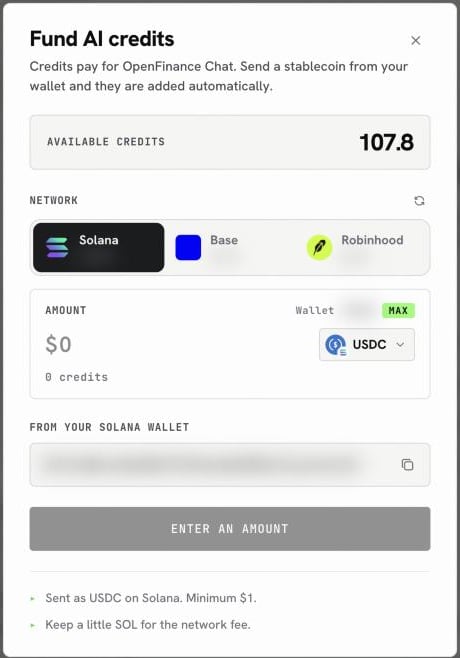
The Fund AI credits sheet
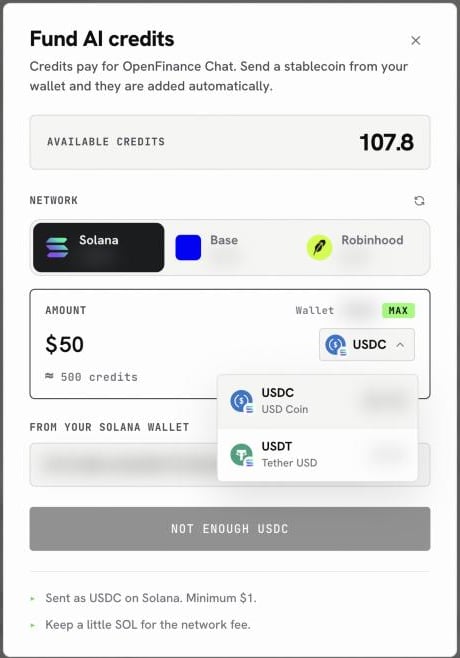
Pick the coin to pay with; each shows your balance
If the button will not go
The Fund button tells you what is missing instead of failing silently:
If a payment is sent but the credits have not shown up after a minute or two, keep the transaction hash the sheet shows and email dev@openfinance.tech.
Next
Models and AI credits
Pick the right model for each job.
Inference API
Spend the same credits from your own code.