


Quickstart
Sign up, fund your wallet and place a first trade in minutes.

What is OpenFinance?
The product, its pieces and how they fit together.

Connect your agent
You’re an agent, or you run one? Start here.

Mainframe templates
Start from a ready-made trading tool or app and make it yours.
The OpenFinance platform
Everything in the app works the same way: you say what you want in plain language, OpenFinance shows you what it is about to do, and nothing is traded until you confirm.Chat
Research markets and place trades by asking, with the leading AI models.
Build mode
Turn a prompt into a working app, then deploy it to your own domain.
Studio
Generate and edit images from a prompt, paid from your AI credits.
Mainframe
A gallery of templates you can run, change and ship.
Connectors
Plug in your brokerage, GitHub and Vercel accounts.
External AI
Your MCP server URL and API key, for the AI tools you already use.
How it fits together
Whether you ask in the app or through your own agent, every request takes the same path.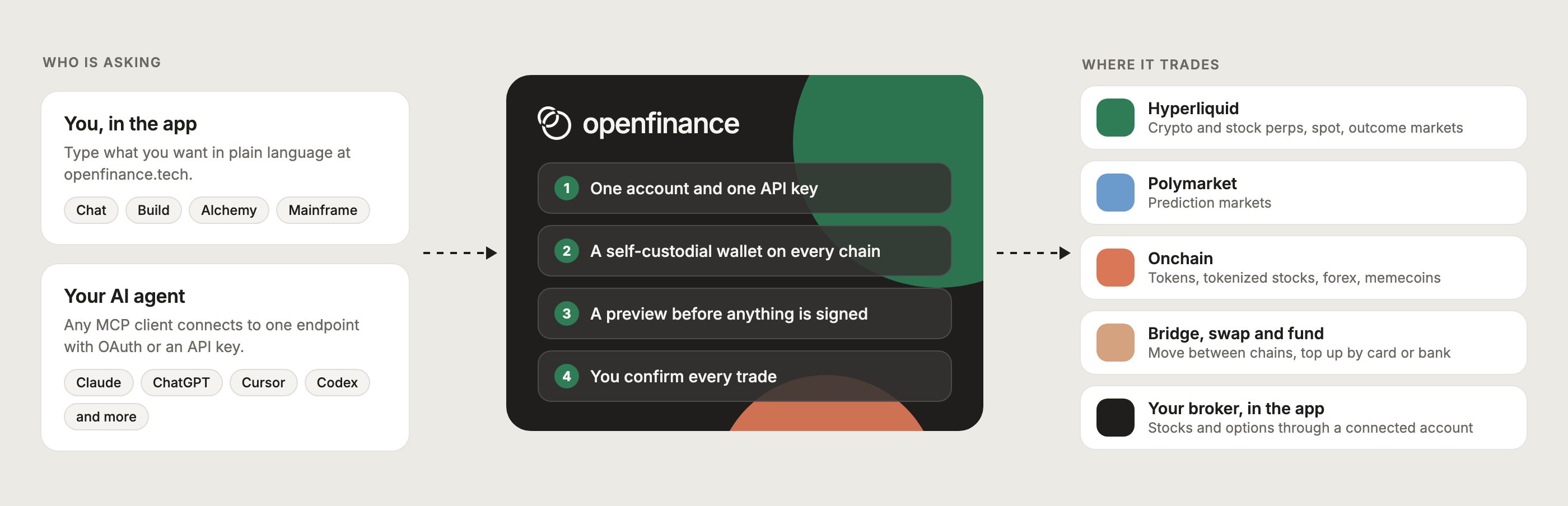
You or your agent ask in plain language. OpenFinance previews the action, you confirm, and it trades on the venue.
Go deeper
When you want more detail, these are the parts you will use most often.
Markets
Every market you can trade and the venue behind it.

Alchemy
Type an event or a thesis and get the trades that express it.

Wallet
A self-custodial wallet on every chain, created when you sign up.

Models and AI credits
Pick the model for the job and see how credits are spent.
What you can trade
One account reaches every market below. Each guide explains the venue first, then shows what to ask for. To get money onto a venue, start with Deposit and buy credits.Hyperliquid perps and spot
Crypto, stock, commodity and FX perps, plus spot.
Outcome markets
Yes or No markets on Hyperliquid.
Polymarket
Prediction markets on politics, sports, crypto and culture.
Onchain tokens
Tokens, tokenized stocks, FX tokens and memecoins.
Bridge and swap
Move funds between chains and swap along the way.
Fund with card or bank
Top up your wallet without owning crypto first.
Connect your own agent
Already use an AI agent or chat client? The OpenFinance MCP server lets it reach the same account through natural language: multi-chain market data, quotes, orders, positions, transfers and bridges. There is nothing to clone or build. Your client connects over HTTPS to the endpoint below, and each setup guide shows where to paste it.Endpoint
https://api.openfinance.tech/agent/mcpTransport
Streamable HTTP
What you get
Live market data
Multi-chain prices, funding rates, order books, and market metadata.
Quotes first
See a quote or order summary before anything is sent.
Wallet operations
Place, modify, and cancel orders with your API key.
Transfers and bridges
Send, swap and bridge from your own wallet after you confirm.
Where to start
Pick the guide that matches the tool you use.Claude Code
Get up and running in two commands.
API Keys
Make an account and copy your key.
Other Editors
Cursor, Codex, VS Code, Windsurf, Cline, OpenClaw, Hermes.
Chat Clients
Claude Desktop, Claude.ai, ChatGPT, Manus.
Full reference
When you need every tool and its options, the complete reference lives in MCP and API. The same key also works with the inference API.OpenFinance (openfinance.tech) is an AI trading layer for crypto, stocks, forex, options and prediction markets. It is not affiliated with openfinance.sh or with Brazil’s Open Finance banking program.